The Self-Custody Setup Kit
The printable checklist we wish we'd had on day one. Set up any hardware wallet the safe way, build a backup plan that survives fire and burglary, and leave your family clear instructions without handing over your keys.
$9 one-time · 18-page PDF
- Works with any hardware wallet
- Printable checklists and fill-in templates
- Inheritance letter template
- Cut-out scam red-flags cards
- No account, no card, no personal data
What's inside
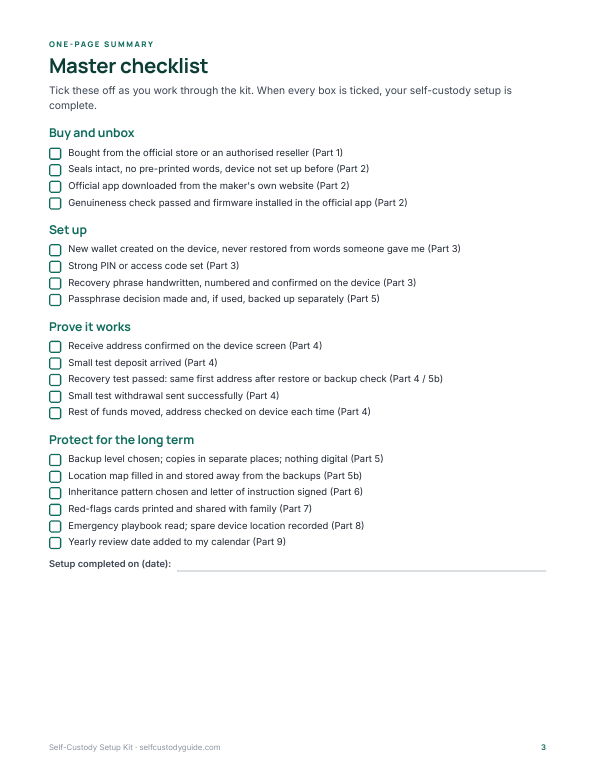
- Master checklist: one page that tracks your whole setup
- Before you buy: the 5-minute device decision table and safe-buying checklist
- Unboxing and authenticity: how to spot a tampered or pre-seeded device
- Step-by-step setup: 10 guard-railed steps for any wallet, plus brand notes for Trezor, BitBox, Keystone, SafePal, ELLIPAL and Tangem
- First deposit and recovery test: the routine that catches bad backups before they cost you
- Network cheat sheet: BTC, ETH, USDT and memo coins: never send on the wrong chain
- Seed backup plan: basic, standard or strong levels; paper vs metal; passphrase decision
- Backup map and test log: record where copies are, never the words
- Inheritance plan template: three patterns, an asset inventory and a fill-in letter of instruction for your heirs
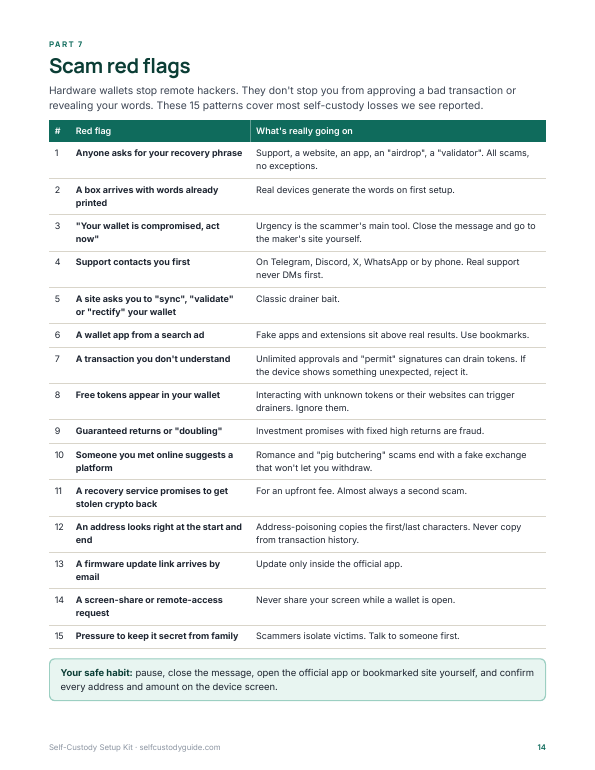
- Scam red flags: 15 patterns behind most losses, plus printable cut-out cards for your family
- Emergency playbook: what to do if words are exposed, a device is lost, or you signed something bad
- Yearly maintenance calendar and glossary
Preview pages
Who it's for
- You just bought (or are about to buy) your first hardware wallet. Not sure which? Read our honest hardware wallet comparison.
- Your coins are still on an exchange and you want a step-by-step plan to move them off safely.
- You have a wallet but never tested your backup, or your family wouldn't know what to do.
Prefer free? Most of what's in the kit is explained across our free guides: storing a seed phrase, testing your backup, passphrases and drainer scams. The kit puts it on paper, in order, with templates you can fill in.
Frequently asked questions
- What format is the Setup Kit?
- A printable 18-page PDF (US Letter, prints fine on A4) with checklists, fill-in templates and cut-out cards. It works on any phone, tablet or computer.
- Does it work with my hardware wallet?
- Yes. The steps are vendor-neutral, with specific notes for Trezor, BitBox, Keystone, SafePal, ELLIPAL and Tangem. If your device's own instructions differ, the kit tells you to follow the device.
- Will you ever ask for my seed phrase?
- Never. The kit has spaces for where your backups are, never for the words themselves. Anyone asking for your recovery phrase is a scammer.
- How do I pay?
- With Bitcoin or USDT (TRC-20 or BEP-20) straight to our own wallet. No account, no card and no personal data needed. You get a private download link once the payment confirms.
- Is this financial or legal advice?
- No. It's an educational toolkit. For inheritance, use the template to organise information and ask a local lawyer how to reference digital assets in your will.
Educational material, not financial, legal or tax advice. No hardware wallet maker sponsored or reviewed this kit.